If you’re building AI agents, you’ve probably run into a fundamental limitation: LLMs forget everything the moment you close the conversation. This article explains how agent memory works and compares five popular solutions to the problem: Mem0, Zep, Cognee, Letta Platform, and AI Memory SDK.
Agent memory
When you call an LLM like GPT-4 or Claude, it only knows what’s in the current prompt. There’s no persistent memory of past conversations, user preferences, or learned behaviors. This stateless design works fine for one-off questions, but breaks down when building agents that need to maintain context across multiple interactions.
Agent memory solves this by adding persistent storage that agents can read from and write to. It transforms stateless LLMs into stateful agents that can remember user preferences, learn from past interactions, and provide personalized experiences.
The simplest form of memory is keeping the conversation history in the context window. But context windows have limits, making this solution expensive and slow. The diagram below shows the difference between stateless and stateful approaches. Stateless agents require manual prompt engineering to manage an unstructured context window, while stateful agents use structured memory blocks. A memory system like Letta automatically compiles context from persistent state storage into these organized blocks.
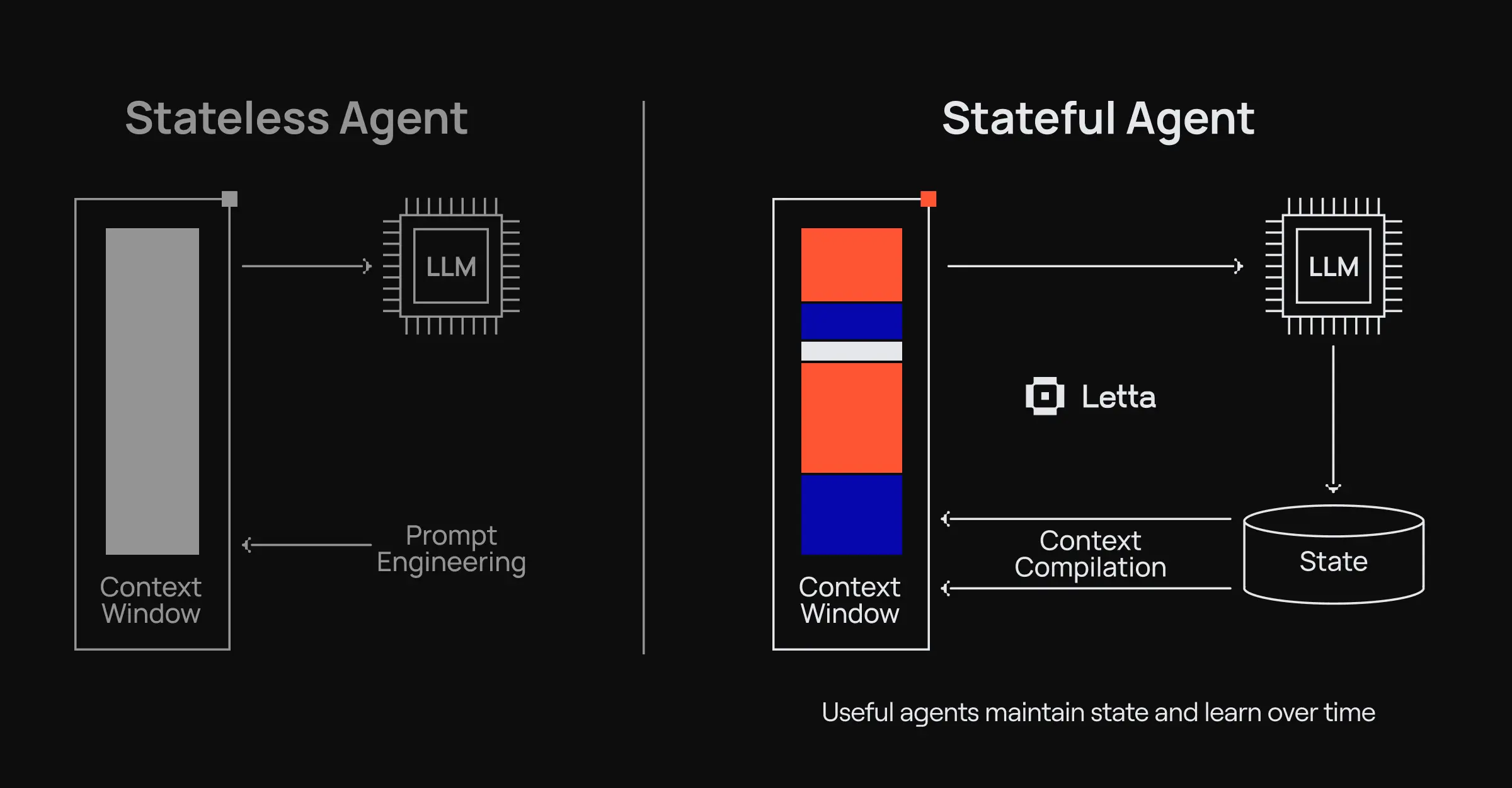
Agent memory typically involves two components:
- Working memory is the information currently loaded in the agent’s context window, which functions similarly to your short-term memory during a conversation. It holds the immediate context needed to respond to the current request.
- Long-term storage consists of external databases (vector stores, knowledge graphs, or traditional databases) that store information beyond what fits in the context. Agents retrieve relevant information from long-term storage and load it into working memory as needed.
The challenge is deciding what information to store, how to organize it, and when to retrieve it. Different memory solutions approach these decisions in different ways.
How agent memory works
Before diving into specific tools, we’ll look at the different architectural approaches to agent memory. Each solution in this article takes one (or a combination) of these approaches.
Drop-in memory layers
This approach treats memory as an external service that wraps around your existing stateless agent. You continue using your LLM as before, but prior to each request, the memory layer retrieves relevant context and injects it into the prompt. After each response, it extracts and stores important information.
Think of drop-in memory layers like adding a note-taking assistant that sits between you and your agent. The agent itself stays stateless, but the memory layer manages what to remember and when to surface it.
Tools like Mem0 use this approach. They provide APIs to store and retrieve memories, but your agent architecture stays largely the same.
Temporal knowledge graphs
Facts change. A user might move from San Francisco to New York, then back to San Francisco. Their job title might change. Their preferences might evolve. Most memory systems either overwrite old information or accumulate contradictions.
Temporal knowledge graphs solve the problem of lost or contradictory information by tracking when facts are valid. Instead of storing “User lives in San Francisco,” they store “User lived in San Francisco (valid: Jan 2023–May 2024),” and “User lives in New York (valid: May 2024–present).”
A temporal knowledge graph maps entities (users, places, and concepts) as nodes and relationships as edges with time metadata. When you query a graph, you can ask for current facts or historical context.
Zep uses this approach with its Graphiti engine, which builds temporal knowledge graphs from conversations and business data.
Semantic knowledge graphs
While temporal knowledge graphs focus on when facts are valid, semantic knowledge graphs focus on what facts mean and how they relate to one another. This approach uses ontologies (structured representations of domain knowledge) to understand the relationships between concepts.
Instead of just storing chunks of text in a vector database, semantic knowledge graphs build structured representations of how the text chunks relate to one another. When you mention “Python,” the system understands it relates to “programming languages,” “Guido van Rossum,” and “machine learning libraries.” These relationships enable more intelligent retrieval.
This approach combines vector search for semantic similarity with graph traversal for relationship-based queries. You can ask, “What programming languages has the user worked with?” and get answers that understand the conceptual relationships.
Cognee builds these semantic knowledge graphs on the fly during document processing and retrieval.
Stateful programming
The previous three approaches treat memory as a feature you add to stateless agents. But there’s a fundamentally different approach: designing agents to be stateful from the ground up.
In stateful programming, memory isn’t an add-on. The agent’s entire architecture revolves around maintaining and modifying state over time. Instead of retrieving memories before each request, the agent continuously operates with persistent state.
This is similar to the difference between functional programming (stateless) and object-oriented programming (stateful). In functional programming, functions don’t maintain state between calls. In object-oriented programming, objects maintain internal state that persists and evolves.
Stateful agents have memory blocks that they can read and write to directly. These memory blocks are part of the agent’s core architecture, not external storage accessed through APIs. The agent can decide what to remember, what to forget, and how to organize its own memory.
The Letta Platform uses this approach. Agents exist as persistent entities with self-modifying memory, not as stateless functions called on demand.
For developers who want memory capabilities without adopting the full stateful paradigm, pluggable memory solutions like Letta’s AI Memory SDK provide a middle ground. These are lightweight libraries that add memory to existing applications without requiring an architectural shift.
Mem0: Universal memory layer for LLM applications
Mem0 (pronounced “mem-zero”) is a drop-in memory layer that adds persistent memory to AI applications. It sits between your LLM and your application logic, automatically extracting and storing important information from conversations.
How Mem0 works
Mem0 uses a two-phase approach to manage memory.
-
Extraction phase: When you add messages to Mem0, it analyzes the conversation to identify important facts, preferences, and context. It uses an LLM (GPT-4 by default) to determine what’s worth remembering. This isn’t just storing raw messages. Mem0 distills conversations into structured memories like “User prefers vegetarian food” or “User works as a backend developer in Python.”
-
Update phase: After extraction, Mem0 intelligently updates its memory store using a hybrid architecture that combines vector databases (for semantic search), graph databases (for relationships), and key-value stores (for fast lookups). If new information contradicts existing memories, it updates them. If information is redundant, it consolidates. This prevents memory from growing unbounded with duplicate or outdated information. According to research by the Mem0 team, this approach achieves over 90% reduction in token costs compared to full-context methods, along with 26% better accuracy and 91% lower latency.
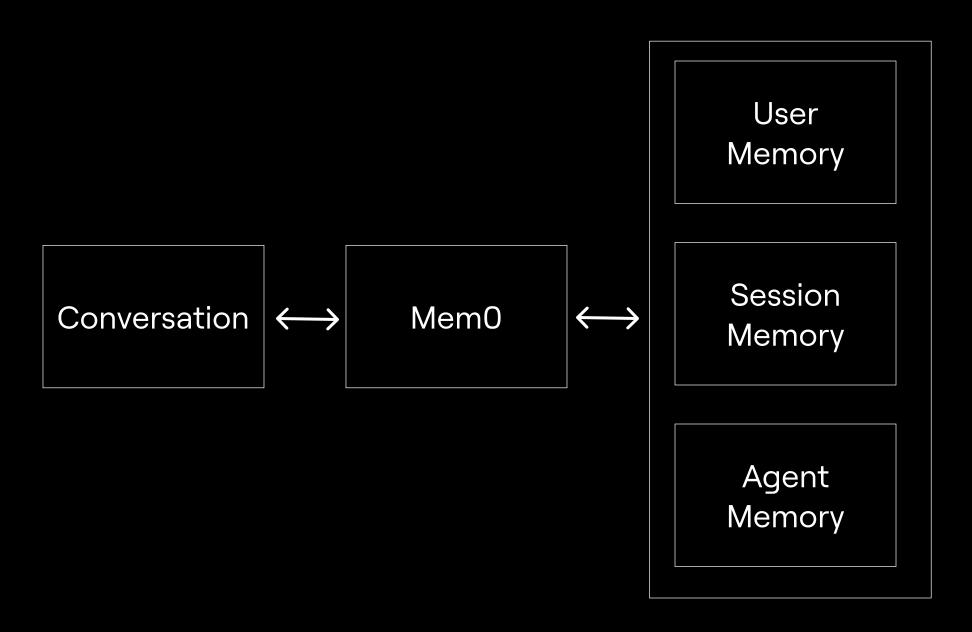
Multi-level memory: User, session, and agent state
Mem0 organizes memories into three levels:
- User memory stores long-term facts about individual users that persist across all sessions. This includes preferences, biographical information, and historical context. User memories are identified by a
user_id. - Session memory stores temporary context for a specific conversation or task. Session memories are useful for maintaining context within a single interaction but can be discarded afterward. These use a
session_id. - Agent memory stores information about the agent itself, its capabilities, learned behaviors, or instructions. This helps agents maintain consistent personas and improve over time. These use an
agent_id.
Implementing Mem0 in your application
Install Mem0:
pip install mem0ai
Complete the basic setup and memory storage:
from mem0 import Memory

# Initialize memory
m = Memory()

# Add a conversation to memory
messages = [
    {"role": "user", "content": "Hi, I'm Alex. I'm a vegetarian."},
    {"role": "assistant", "content": "Hello Alex! I'll remember that you're vegetarian."},
    {"role": "user", "content": "I love Italian food."},
    {"role": "assistant", "content": "Great! I'll keep that in mind."}
]

# Store with user ID
m.add(messages, user_id="alex")
Retrieve memories:
# Get all memories for a user
all_memories = m.get_all(user_id="alex")
print(all_memories)
# Output: [
#   {"memory": "User is named Alex"},
#   {"memory": "User is vegetarian"},
#   {"memory": "User loves Italian food"}
# ]

# Search for specific information
results = m.search(
    query="What are Alex's food preferences?",
    user_id="alex"
)
print(results)
# Returns relevant memories ranked by relevance
Configure Mem0 with a vector store:
from mem0 import Memory

config = {
    "vector_store": {
        "provider": "qdrant",
        "config": {
            "host": "localhost",
            "port": 6333
        }
    }
}

m = Memory.from_config(config)
Mem0 works with OpenAI by default, but supports other LLM providers. It integrates with popular frameworks like LangChain, LangGraph, and CrewAI, making it easy to add memory to existing agent implementations.
Zep: Temporal knowledge graphs for agent memory
Zep is a context engineering platform built around temporal knowledge graphs. Unlike systems that simply store facts, Zep tracks how information changes over time and maintains historical context. This makes it particularly useful when facts evolve or contradict previous information.
How Zep works
At the core of Zep is Graphiti, an open-source library for building temporal knowledge graphs. When you add conversation data to Zep, Graphiti extracts entities (for example, people, places, and concepts) and relationships (for example, works at, lives in, and prefers) and stores them as a graph.
What makes this graph temporal is Zep’s bi-temporal model, which tracks two separate timelines:
- Event time reflects when events actually happened in the real world.
- Transaction time reflects when information was recorded in the system.
Each edge in the graph includes validity metadata. When a fact changes, Zep doesn’t overwrite the old information. Instead, it marks the old fact’s validity period as having ended and creates a new fact with its own validity period.
For example, if a user says, “I moved from Austin to Seattle,” Zep creates two location relationships with different time periods. When you ask, “Where does the user live?” you get Seattle. But you can also query historical information like, “Where did the user live in March 2024?” and get Austin.
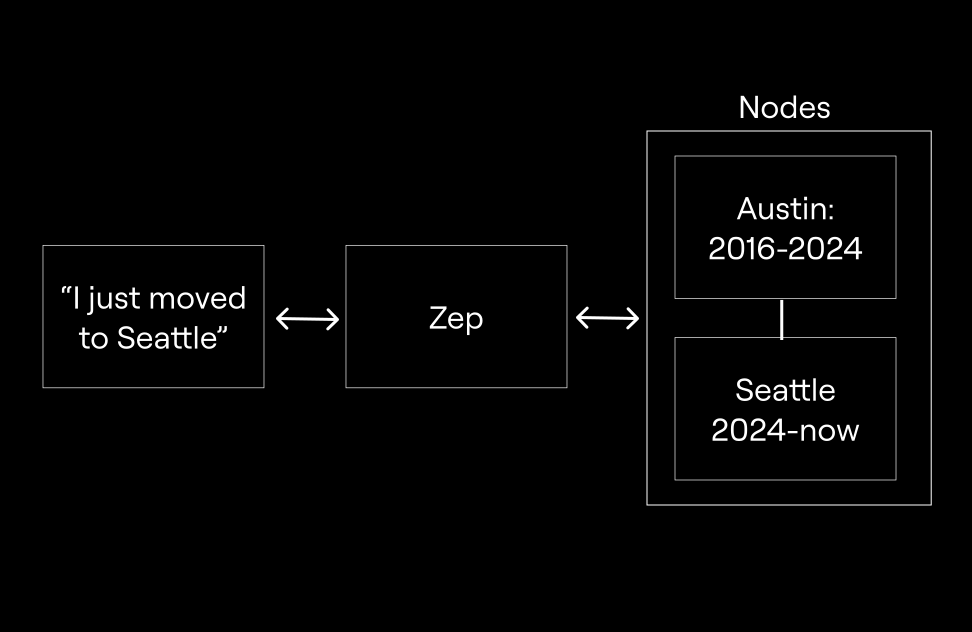
Zep uses a hybrid search approach, combining vector similarity (for semantic matching) and graph traversal (for relationship-based queries). This lets you ask questions like, “What companies has the user worked for?” and get answers that understand the relationships between entities.
Tracking change over time
The temporal aspect becomes valuable in real-world scenarios where information changes as:
- User preferences evolve (for example, stopped being vegetarian or changed career paths)
- Business data updates (for example, company acquisitions or org changes)
- Relationships change (for example, manager changes or location changes)
Traditional memory systems handle these changes either by overwriting old data (losing history) or by accumulating contradictory facts (creating confusion). Temporal graphs maintain both current truth and historical context.
Integrating Zep into your agent
Install Graphiti:
pip install graphiti-core
Set up environment variables for your graph database:
export OPENAI_API_KEY=your_openai_api_key
export NEO4J_URI=bolt://localhost:7687
export NEO4J_USER=neo4j
export NEO4J_PASSWORD=password
Initialize Graphiti and build indices:
import os
import asyncio
from dotenv import load_dotenv
from datetime import datetime, timezone

from graphiti_core import Graphiti
from graphiti_core.nodes import EpisodeType

load_dotenv()

neo4j_uri = os.environ.get('NEO4J_URI', 'bolt://localhost:7687')
neo4j_user = os.environ.get('NEO4J_USER', 'neo4j')
neo4j_password = os.environ.get('NEO4J_PASSWORD', 'password')

# Initialize with Neo4j
graphiti = Graphiti(
    uri=neo4j_uri,
    user=neo4j_user,
    password=neo4j_password
)

async def main():
    # Build indices (one-time setup)
    await graphiti.build_indices_and_constraints()
Add conversation data as episodes:
    # First conversation
    await graphiti.add_episode(
        name="User location update",
        episode_body="The user mentioned they live in Austin and work at TechCorp",
        source=EpisodeType.message,
        source_description="Chat message from user onboarding",
        reference_time=datetime.now(timezone.utc),
    )

    # Later conversation with updated information
    await graphiti.add_episode(
        name="User relocation",
        episode_body="The user said they moved to Seattle and started at NewCompany",
        source=EpisodeType.message,
        source_description="Chat message from follow-up",
        reference_time=datetime.now(timezone.utc),
    )
Query with temporal awareness:
    # Get current facts
    results = await graphiti.search(
        query="Where does the user live and where do they work?",
        num_results=5
    )

    for result in results:
        print(f"Fact: {result.fact}")
        print(f"Valid from: {result.valid_from}")
        if result.valid_until:
            print(f"Valid until: {result.valid_until}")
        print("---")

    # Output includes both historical and current facts with validity periods
Zep also offers a cloud-hosted version if you don’t want to manage your own graph database infrastructure. The Graphiti library supports Neo4j, Amazon Neptune, FalkorDB, and Kuzu as database backends.
title: Agent memory solutions: Letta vs Mem0 vs Zep vs Cognee (Part 2)
slug: guides/education/agent-memory-comparison-part-2
This is Part 2 of our agent memory comparison series. Part 1 covered the fundamentals of agent memory, Mem0’s drop-in memory layer, and Zep’s temporal knowledge graphs. In this part, we’ll explore Cognee’s semantic knowledge graphs and Letta’s stateful agent platform.
Cognee: Semantic memory with knowledge graphs
Cognee is an open-source library that builds semantic knowledge graphs from your data. It’s designed to provide sophisticated semantic understanding through knowledge graph construction.
How Cognee works
Traditional retrieval-augmented generation (RAG) systems embed documents into vectors and retrieve chunks based on similarity. This approach works, but it overlooks the relationships between concepts.
Cognee takes a different approach. When you add data, it builds a knowledge graph that captures entities and their relationships. The graph uses ontologies to understand how concepts relate to one another.
For example, if your documents mention “Python,” “machine learning,” and “scikit-learn,” Cognee doesn’t just store these keywords as separate chunks. It understands that Python is a programming language, machine learning is a field, and scikit-learn is a Python library for machine learning. These relationships enable smarter retrieval.

Building knowledge graphs
Cognee combines two storage layers:
-
A vector database for semantic similarity search, which supports Weaviate, Qdrant, LanceDB, and others.
-
A graph database for relationship modeling, which supports Neo4j and Kuzu.
When you query Cognee, it searches both the vector database for semantically similar content and the graph database for related concepts. This hybrid approach lets you ask questions like “What Python libraries are mentioned?” and get answers that understand Python as a programming language context.
The knowledge graph is built automatically during the “cognify” process, which analyzes your data, extracts entities and relationships, and structures them according to domain ontologies.
Adding Cognee to your agent
Install Cognee:
pip install cognee
Run the basic 5-line implementation:
import cognee
import asyncio

async def main():
    # Add data to Cognee
    await cognee.add("Natural language processing (NLP) is an interdisciplinary subfield of computer science.")

    # Process into knowledge graph
    await cognee.cognify()

    # Query with semantic understanding
    result = await cognee.search(query_text="Tell me about NLP")
    print(result)

asyncio.run(main())
Work with multiple documents:
import cognee
import asyncio

async def main():
    # Add related documents
    documents = [
        "GPT-4 is a large language model developed by OpenAI.",
        "OpenAI was founded in 2015 by Sam Altman, Elon Musk, and others.",
        "Sam Altman is the CEO of OpenAI and formerly led Y Combinator."
    ]

    await cognee.add(documents)
    await cognee.cognify()

    # Query understanding relationships
    result = await cognee.search(query_text="Who leads OpenAI?")
    print(result)
    # Returns answer understanding the relationships between
    # Sam Altman, CEO role, and OpenAI

asyncio.run(main())
Lastly, configure database backends using environment variables, typically stored in a .env file in your project’s root directory. The library automatically loads these variables on startup.
Here is an example .env file for connecting to Qdrant and Neo4j:
LLM_PROVIDER="openai"
LLM_MODEL="gpt-4"
LLM_API_KEY="your_openai_api_key"

VECTOR_DB_PROVIDER="qdrant"
# QDRANT_URL="http://localhost:6333" # Optional: for non-default host

GRAPH_DB_PROVIDER="neo4j"
NEO4J_URI="bolt://localhost:7687"
NEO4J_USER="neo4j"
NEO4J_PASSWORD="password"
Cognee integrates with agent frameworks like LangChain and CrewAI, making it easy to add semantic memory to existing agent implementations. The knowledge graph construction is automatic, so you don’t need to manually define schemas or relationships.
Letta: Memory as infrastructure
Letta takes a fundamentally different approach to the other solutions in this article. While Mem0, Zep, and Cognee add memory capabilities to stateless agents, Letta is a general-purpose memory programming system for building stateful agents that have memory embedded into their core architecture.
How Letta works
The Letta Platform treats agents as persistent entities with continuous state, not as functions called on demand. When you create a Letta agent, it exists on the server and maintains state even when your application isn’t running. There are no sessions or conversation threads. Each agent has a single, perpetual existence.
This fundamentally changes how you think about agent development. Instead of fetching relevant memories before each LLM call, the agent continuously operates with its memory state. Memory isn’t something you manage externally. It’s part of the agent’s core architecture.
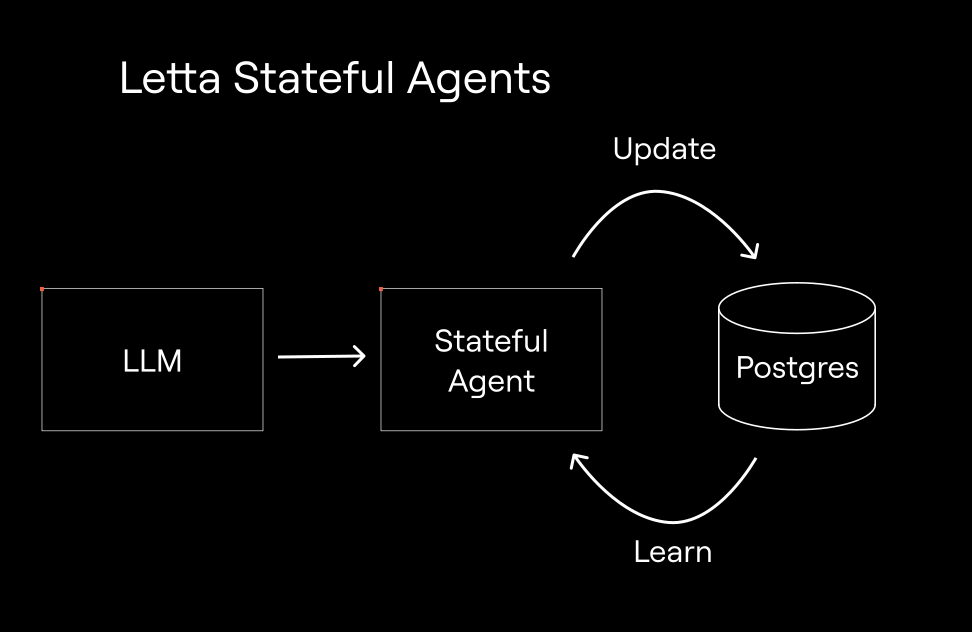
Letta was built by the researchers behind MemGPT, which pioneered the concept of treating LLM context management similar to how an operating system manages memory. The platform provides sophisticated memory management that lets agents learn how to use tools, evolve personalities, and improve their capabilities over time.
Core memory and archival memory
Letta implements a two-tier memory architecture:
- The core memory lives inside the agent’s context window and is always available. This is the most important component for making your agent maintain consistent state across turns. Core memory is organized into memory blocks that the agent can read and write to directly, holding the agent’s most critical, frequently-accessed state.
- The archival memory provides long-term retrieval for information outside the context window. When an agent needs information from archival memory, it retrieves the relevant pieces and loads them into core memory. Letta also supports file-based retrieval through the Letta Filesystem.
This hierarchy is similar to the way operating systems manage RAM and disk storage. Hot data stays in RAM (core memory), while cold data lives on disk (archival memory) and is paged in when needed.
Memory blocks: Self-modifying agent state
Memory blocks are the fundamental units of Letta’s memory system. Each block is a structured piece of information that the agent can modify. Unlike external memory systems, where you programmatically update memories through APIs, Letta agents can directly edit their own memory blocks.
For example, a Letta agent might have three memory blocks for storing different data.
- Human Block: Information about the user (such as name, preferences, and history)
- Persona Block: The agent’s identity and behavior guidelines
- Custom Blocks: Domain-specific state (such as project context and code knowledge)
These blocks are editable by the agent itself, other agents, or developers through the API. This enables agents to learn and adapt their behavior based on experience.
Letta agents use three primary tools to edit their memory blocks:
memory_insert- Insert content into a block (useful for appending new information)memory_replace- Search and replace specific text within a block (useful for updating existing information)memory_rethink- Rewrite an entire block (useful for reorganizing or restructuring memory)
These tools give agents fine-grained control over how they manage their own memory, enabling them to decide what information is important enough to persist and how to organize it.
Memory blocks can also be shared between multiple agents. By attaching the same block to different agents, you can create powerful multi-agent systems where agents collaborate through shared memory. For example, multiple agents working on a project could share an “organization” or “project context” block, allowing them to maintain synchronized state and share learned information.
When agents build up extensive conversation histories, Letta can offload memory updates to background processes. A secondary agent handles memory consolidation separately from the main conversation flow, preventing memory operations from slowing down responses. The background processing frequency is configurable (defaulting to every 5 conversation steps), letting you balance how current the memory stays against processing overhead.
The current agent architecture in Letta leverages the model’s built-in reasoning capabilities and produces responses directly rather than routing them through intermediate tool invocations. This approach is compatible across different LLM providers. When switching between architectural patterns, you’ll export your agent configuration to the .af format and update the agent type setting.
Building with Letta
Install Letta:
# For local server development
# The sqlite-vec extension is loaded automatically by the local server but may need to be installed if not already installed
pip install letta

# For client SDK only (connecting to Letta Cloud or existing server)
pip install letta-client
Set up environment variables:
export OPENAI_API_KEY=your_openai_api_key
Start the local server:
letta server
The Letta platform includes a visual Agent Development Environment (ADE) that lets you:
- Create and configure agents through a UI
- View agent memory blocks in real-time
- Monitor the agent’s decision-making process
- Test and debug agent behavior

Create an agent with the Python SDK (on the local server):
from letta_client import Letta

# Connect to local Letta server
client = Letta(base_url="http://localhost:8283")

# Create agent with memory blocks
agent = client.agents.create(
    memory_blocks=[
        {
            "label": "human",
            "value": "Name: Sarah. Role: Senior Backend Engineer. Preferences: Prefers Python over JavaScript, likes concise explanations."
        },
        {
            "label": "persona",
            "value": "I am a helpful coding assistant. I adapt my explanations to the user's expertise level and communication style."
        }
    ],
    model="openai/gpt-4o-mini",
    embedding="openai/text-embedding-3-small"
)

print(f"Created agent: {agent.id}")
Chat with the agent:
# Send message to stateful agent
response = client.agents.messages.create(
    agent_id=agent.id,
    messages=[
        {"role": "user", "content": "Can you help me optimize this SQL query?"}
    ]
)

# Agent responds with context from its memory blocks
for message in response.messages:
    if hasattr(message, 'reasoning'):
        print(f"Reasoning: {message.reasoning}")
    if hasattr(message, 'content'):
        print(f"Content: {message.content}")
Update memory blocks programmatically:
# Retrieve a specific memory block by label
human_block = client.agents.blocks.retrieve(
    agent_id=agent.id,
    block_label="human"
)

# Update the block with new information
client.blocks.modify(
    block_id=human_block.id,
    value="Name: Sarah. Role: Senior Backend Engineer. Preferences: Prefers Python over JavaScript, likes concise explanations. Currently working on: Microservices migration project."
)
Use Letta Cloud (the hosted platform):
from letta_client import Letta

# Connect to Letta Cloud
client = Letta(token="YOUR_LETTA_API_KEY")

# Create agent (same API, hosted infrastructure)
agent = client.agents.create(
    model="openai/gpt-4.1",
    embedding="openai/text-embedding-3-small",
    memory_blocks=[
        {"label": "human", "value": "The human's name is Alex."},
        {"label": "persona", "value": "I am a helpful assistant."}
    ]
)
Create shared memory blocks for multi-agent systems:
# Create a shared memory block
shared_block = client.blocks.create(
    label="project_context",
    description="Shared knowledge about the current project",
    value="Project: Building a chat application. Tech stack: Python, FastAPI, React. Timeline: 3 months.",
    limit=4000
)

# Create multiple agents that share this block
agent1 = client.agents.create(
    memory_blocks=[
        {"label": "persona", "value": "I am a backend specialist."}
    ],
    block_ids=[shared_block.id],  # Attach shared block
    model="openai/gpt-4o-mini",
    embedding="openai/text-embedding-3-small"
)

agent2 = client.agents.create(
    memory_blocks=[
        {"label": "persona", "value": "I am a frontend specialist."}
    ],
    block_ids=[shared_block.id],  # Both agents share this block
    model="openai/gpt-4o-mini",
    embedding="openai/text-embedding-3-small"
)

# Both agents can now access and modify the shared project context
Important note about block identifiers: Always reference blocks by their block_ids (UUIDs) when connecting them to agents. While labels provide readable names for your convenience, they don’t serve as unique identifiers—the same label can appear on multiple blocks throughout the system. For lookups scoped to a specific agent, combine block_label with the agent ID (as demonstrated in the example at line 503-506).
The key distinction is that Letta agents are stateful by design. The memory isn’t managed separately from the agent. It’s integral to how the agent operates. This enables more sophisticated agent behaviors, like self-improvement, personality evolution, and complex multi-turn interactions where the agent truly learns from experience.
Letta is also fully interoperable with other memory solutions. Through custom Python tools or Model Context Protocol (MCP) servers, you can use Mem0, Zep, Cognee, or any other tool within a Letta agent. This lets you combine Letta’s stateful architecture with specialized memory systems for specific use cases.